Your clients' content, every month, woven the same way
Minwal runs your team's daily work and the monthly content production, from the first draft to the post going live with proof, with a separate portal where your client approves, follows and messages you.
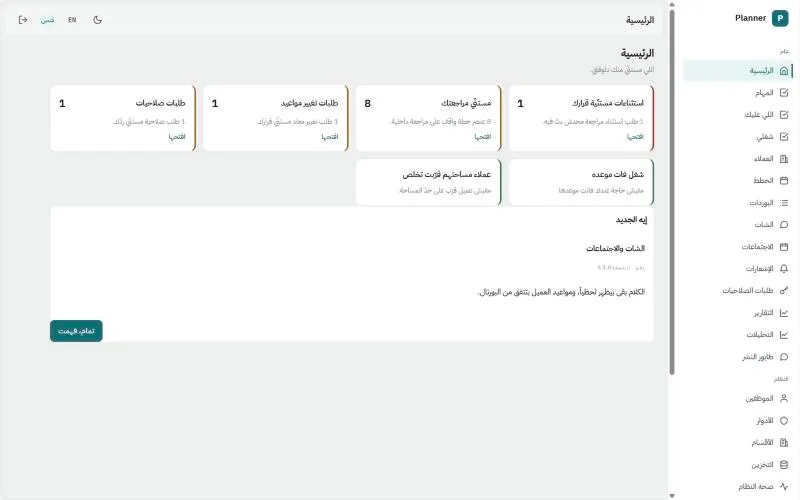
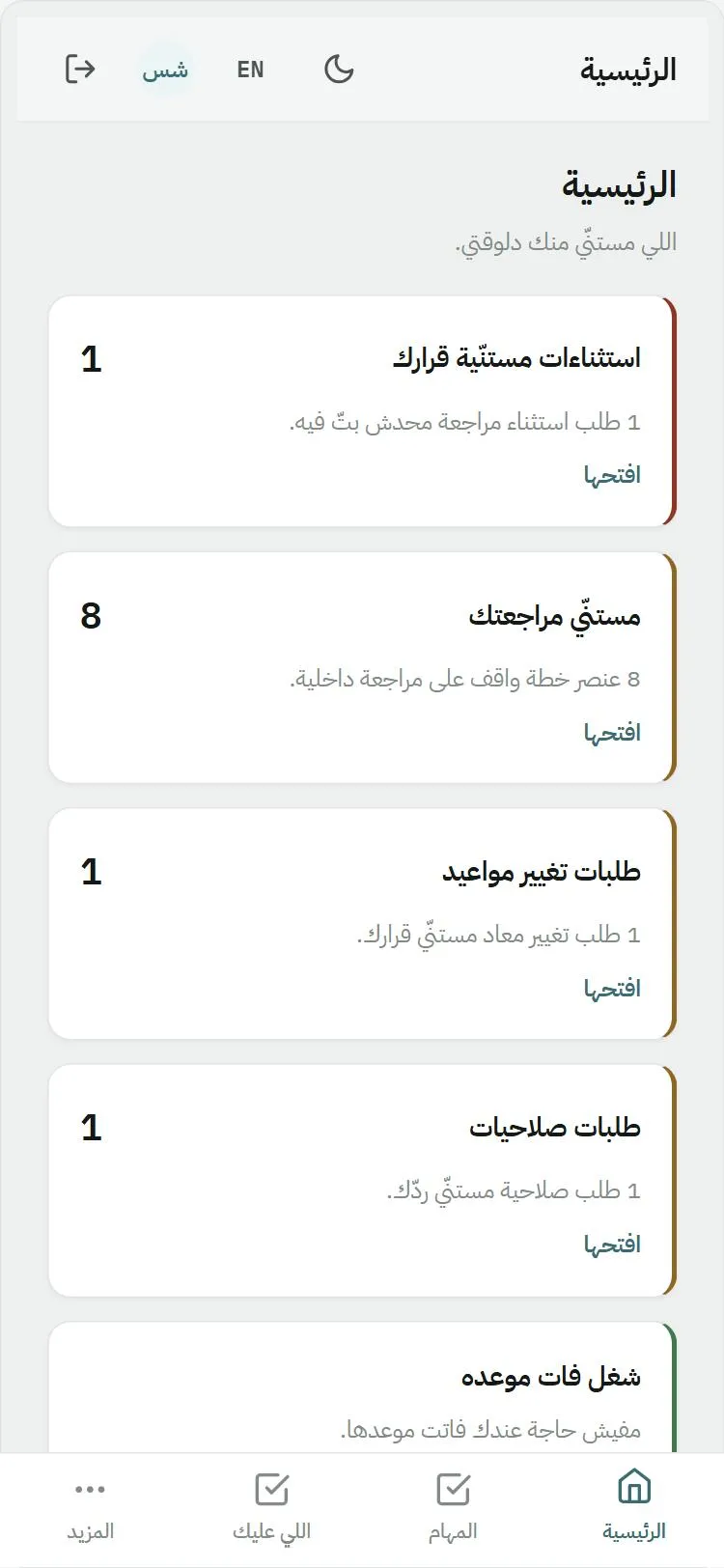
Every decision waiting on you, in one place
Items waiting for your review, due-date changes, access requests and exceptions. Each one disappears the moment you act on it.
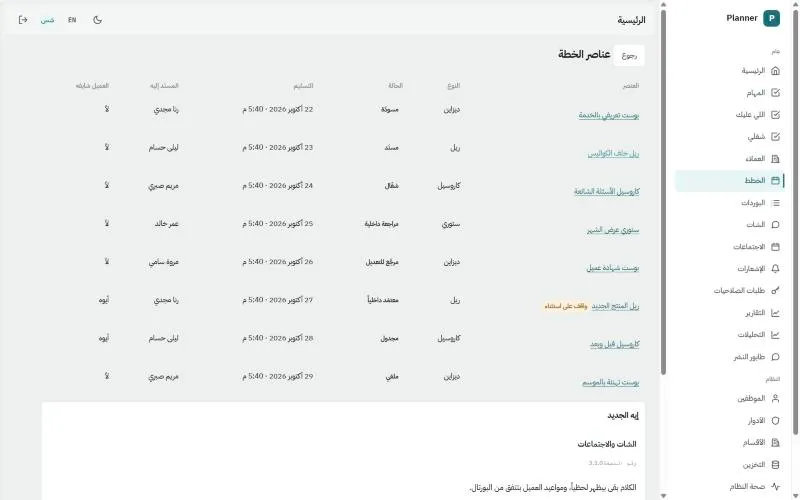
The monthly content plan, item by item
Every item with its type, status, due date and owner, and a column that says whether the client can see it yet.
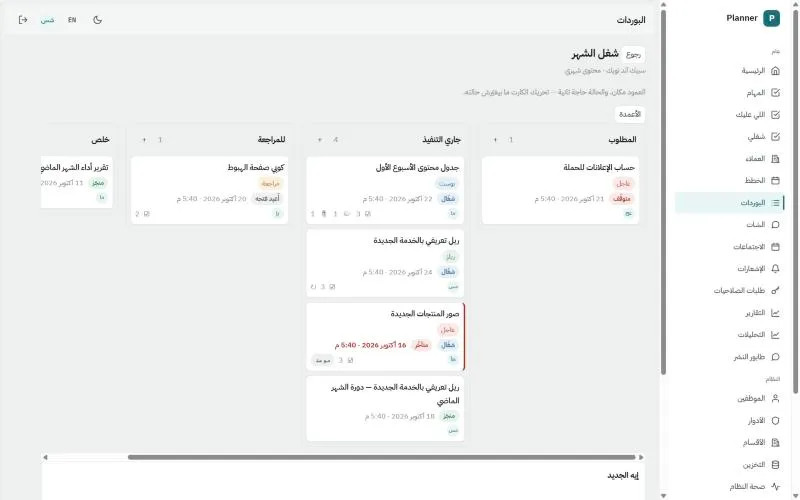
The month's work board
Columns and cards with labels and due dates, and anything overdue is clearly marked.
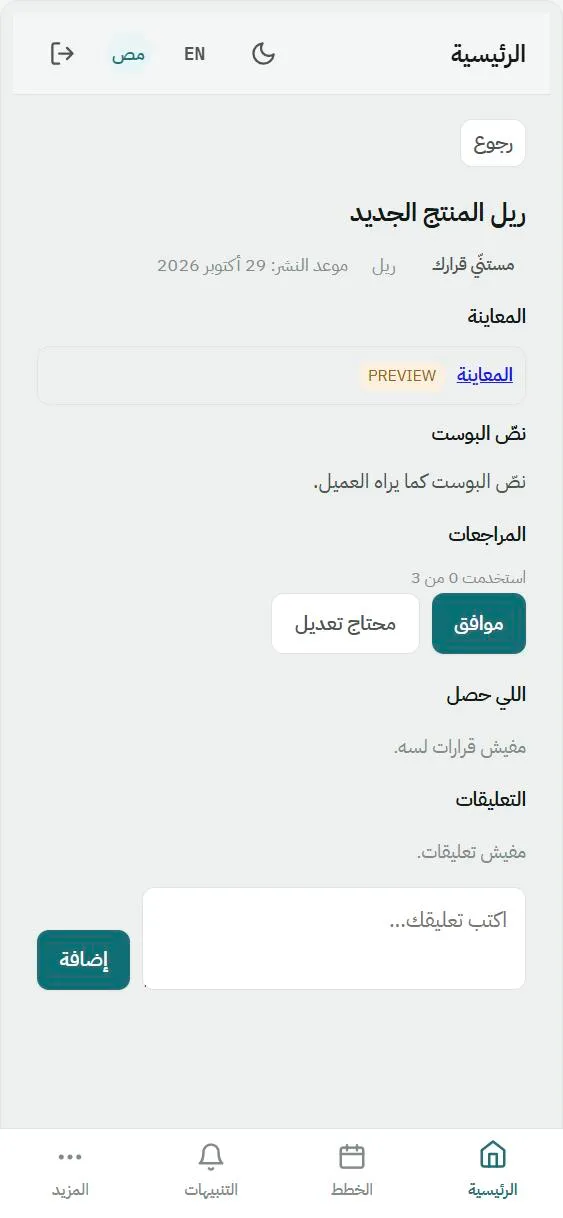
The client approves from their phone
The preview, the caption and the revisions left, with two buttons: approve, or needs changes. The decision is recorded with their name and time.
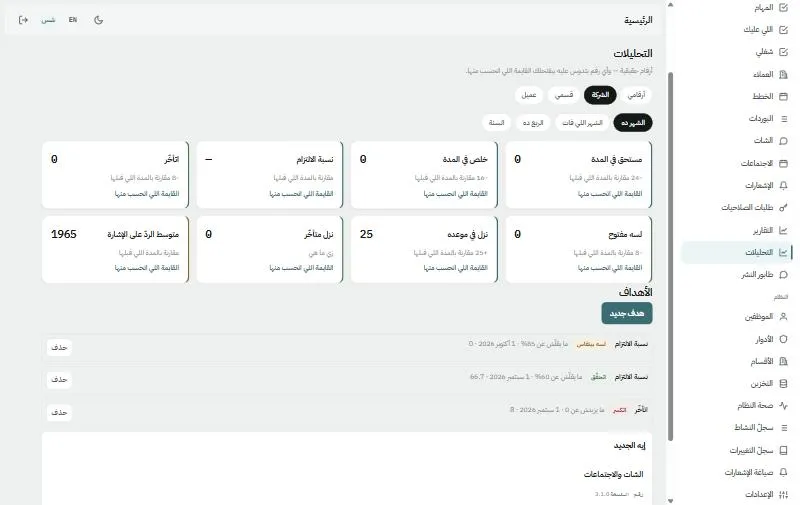
Numbers that open what's behind them
Eight measures compared with the previous period, the list behind every number, and monthly targets with their status.
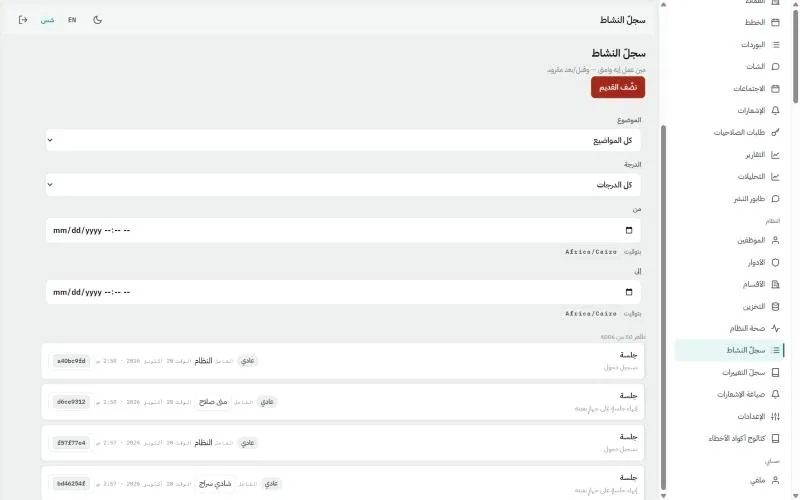
Who did what, and when
Every change writes a line with who, when and a reference number, filterable by subject, severity and period.
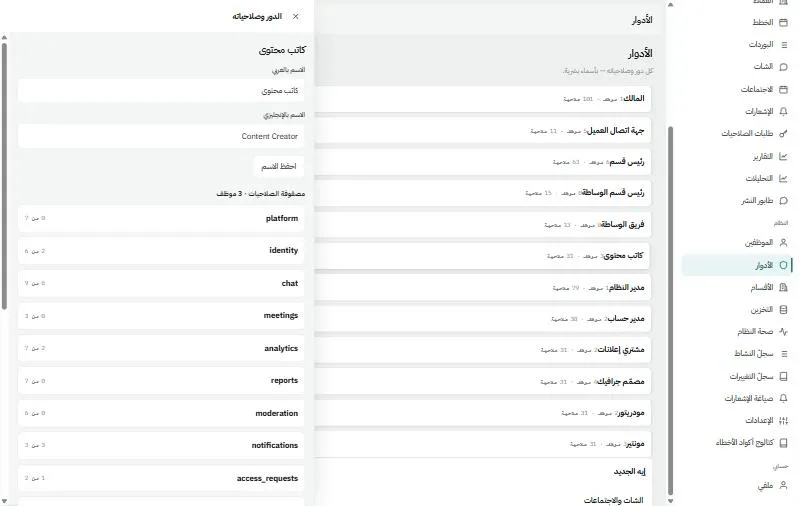
Roles built from a catalog of abilities
Open any role to see its abilities grouped, and you decide what each person can do.
Every screen designed for mobile
The same home on a phone with a bottom bar, installable as an app from the browser.
Four questions your agency can't answer today
Did the client approve?
Without MinwalApproval is a WhatsApp message or something said on a call. Nobody knows who approved, when, or which version.
With MinwalThe client's decision is recorded with their name, time and the exact version, made from their own portal.
Did the post actually go live?
Without MinwalSomeone said it went live, nobody saw the link, and "late" and "failed" look the same.
With MinwalProof of publishing with the post link, "failed" as its own status, and the client sees it in their portal.
Who's late, and who's overloaded?
Without MinwalThere's no number. Rankings and workloads are a feeling.
With MinwalEight measures, and every number opens the rows it was calculated from.
Who was allowed to do that?
Without MinwalThere's no record.
With MinwalEvery change writes a line in the log with who did it, when, and a reference number.
Nothing goes live that your client hasn't seen and approved
Every item in the plan passes three gates in order, and the system itself won't let anyone skip one.
Internal review
Nothing reaches the client before it's reviewed inside the agency.
Client decision
Nothing is scheduled before the client decides.
Proof of publishing
Nothing is closed until it's actually live, with a link.
And the most important guard: any change to what the client sees after they approve sends the item back a step and cancels its publishing automatically.
All of your agency's work, with the client in the picture
Team, plans, publishing and reports in one place, and your client sees only what's theirs.
A locked path from draft to published
Every item in the monthly plan follows a path the system enforces, not a set of instructions.
- Any change to what the client sees after they approve sends the item back a step and cancels its publishing, so nothing goes live the client hasn't seen.
- A limit on "needs changes" per item, after which management must approve an exception, recorded with who asked and who approved.
- Work types your agency defines, such as design, carousel, reel and story.
- Files for every item: the brief, references, the delivery, the client preview, and a tone-of-voice note the client never sees.
Clients approve, follow and message from their own space
Nine separate screens for the client: plans, items, the publishing schedule, reports, chat, meetings, notifications and their team.
- They approve, ask for changes or comment on the item itself, and see publishing dates and each post's link once it's live.
- They read published performance reports, ask for changes to them, and request a meeting.
- The client can't reach any internal screen. This is enforced on the server itself, not just hidden.
- Notifications on the client's phone once they turn them on.
"Did it go live?" now has an answer, with a link
The person who publishes sees a queue of everything scheduled, and marks what went live with the post link.
- Five states for each post: awaiting schedule, scheduled, live, failed and cancelled.
- Withdraw a proof that turns out wrong, and a takedown request after publishing that closes with a recorded decision.
- Set who publishes for each client: the agency or the client.
- Posting to the platforms is done by hand, with a link the client can see as proof.
Boards, cards and tasks on one recorded path
Instead of "tell me on WhatsApp", every request has a place, an owner and a due date.
- Boards from column templates and cards with enforced states, and pausing needs a written reason.
- Due-date change requests that the right person decides, a reminder before the due date and escalation to the department head after.
- Direct tasks from one person to another, which become a card if they grow.
- Attachments scanned for viruses before anyone can open them.
A monthly report with two reviews, and numbers you can trust
The media buyer writes the performance report, the department head reviews it, management publishes it, and the client only sees the published version in their portal.
- One report per client per month, and the client can request changes without sending it back to review.
- Measures at four levels, yours, your department, a client and the company, over four periods compared with the one before.
- Team rankings, client health, workloads, and monthly targets that tell you when they're met or missed.
- Numbers are calculated when you ask for them, and each one opens its list.
Minwal in your agency's name and colour
You start with a simple setup wizard, and your agency's data is kept fully separate from any other. For larger agencies, the Business plan is a private copy on our servers.
- The system's name, colour, default language, time zone and departments, and one colour changes the whole system.
- The app icon on your client's phone is drawn from your agency's name and colour.
- Full Arabic and English, light and dark, and installable as an app on phone and desktop.
- Settings you control, such as the revisions limit, reminder times and how long chats and logs are kept.
Everyone sees and does only what you allow
- Permissions with scope, not yes or no
- A catalog of abilities written in Arabic that you build roles from, and every permission has a scope: the company, a department or specific clients.
- Nobody grants what they don't have
- Every grant passes through one checkpoint that prevents it, whatever path it takes.
- Exceptions that expire
- Temporary individual access with an end date, and an access request right from the screen that refused you.
- A record of every change
- Who, what, when and a reference number, filterable by subject and severity.
- A check before anything sensitive
- Sensitive actions ask for your password again, and a devices screen lets you sign out any session.
- Every error has a code
- A clear message, a fixed code and a reference number support can trace.
Questions with straight answers
Does it work on mobile, or do I need a computer?
Every screen is designed for mobile from the start, and it installs on the phone as an app from the browser, no store needed. Phone notifications are available to clients in their portal; your team gets its notifications inside the system.
Can a client see other clients' work?
No, and it isn't just hidden on screen. The account type is fixed on the session itself, and any action not allowed for the portal is refused on the server.
Can it carry my agency's name and colour?
Yes. The setup wizard takes your name, colour, language, time zone and departments, and one colour changes the whole system, even the app icon on your client's phone.
Does it post to Facebook and Instagram automatically?
No. Your publisher posts by hand and adds the post link as proof, so "did it go live?" has an answer with a link the client can see.
What if a client asks for changes a hundred times?
There's a revisions limit your agency sets. After it, changes need an exception from management, recorded with who asked and who approved.
If something goes wrong, how do I know what happened?
Every error shows a clear message, a code and a reference number, and the system includes a catalog explaining each code's cause and fix.
Is my data shared with other agencies?
No. Each agency's data is kept fully separate, and nobody sees anything of another agency's work. If you want a fully private copy, choose the Business plan.
We'll walk you through Minwal on a complete demo agency
- A live session with our team on a demo agency full of plans, items, boards and reports.
- We show how one client's content moves from draft to published.
- And we set up your account with your agency's name, colour and departments.